UX Research & Product Design Case Study

WhyseApp

Designing a mental health literacy platform for university students.

UX Research Mental Health Literacy 2022
WhyseApp mobile interface preview
Role
Lead UX Researcher & Designer
Tools
Canva, Figma, Google Forms, Excel
Team
1 Project Manager, 1 UX Researcher
Timeline
Oct 2021 – Aug 2022 (10 months)

Overview

During my UX Research Internship at INTEC from October 2021 to August 2022, I developed the Whyse App, a mental health literacy and help-seeking platform aimed at university students. This project evolved from the initial Why App concept I created in 2020. At INTEC, I took on a solo role as the lead UX researcher, conducting user surveys, creating personas, and designing a low-fidelity prototype in Canva.

The main objective was to design an accessible, engaging, and evidence-based mental health app that:

  1. Promotes mental health literacy among university students.
  2. Reduces barriers to help-seeking, such as stigma, cost, and lack of personalized support.
  3. Encourages proactive engagement with mental health resources before students reach a crisis point.

Side Quests

  • FLAD Grant Application – Developed a proposal for a mental health literacy app, focusing on peer-support models and stepped-care interventions.
  • Acredita Portugal Startup Competition – Pitched Whyse as a scalable digital mental health platform, developing its business model and long-term vision.
  • OutSystems Pitch & Mentorship – Worked with a UX Researcher and Product Manager to structure the business and technical roadmap, securing feedback on feasibility and scalability.
Surveys Personas Customer Journey Wireframes

Understanding student needs

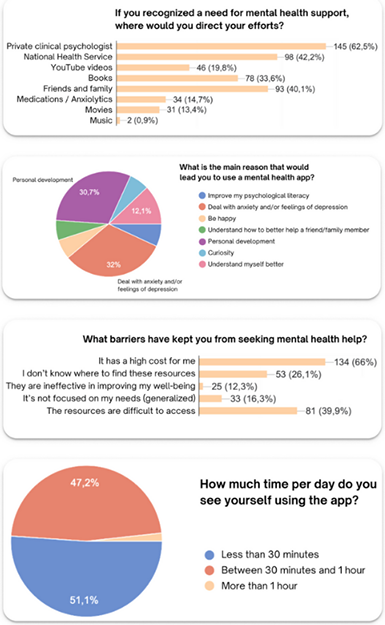
Survey results: help-seeking preferences, app motivations, barriers, and usage time

After the project kickoff, we defined our research strategy and objectives, focusing on understanding the target audience and their mental health challenges.

Survey design

We designed two online surveys distributed via university networks and mental health forums:

  1. First Survey (44 participants): Focused on identifying general mental health needs and existing barriers to seeking help.
  2. Second Survey (232 participants): Delved deeper into the specific features and usability preferences for an ideal mental health app.

Survey structure

  • Mixed Methods: Included a combination of multiple-choice questions, Likert scale ratings, and open-ended responses to gather both quantitative and qualitative data.
  • Key Focus Areas: Mental health literacy levels; preferred app functionalities (e.g., self-assessments, peer support); barriers to using mental health services (e.g., cost, stigma, access).

Key findings

  • High demand for self-assessment tools and personalized guidance.
  • Barriers identified included high costs, difficulty accessing services, and stigma around seeking help.
  • Users preferred flexible, anonymous peer support integrated with professional resources.

Impact on design

  • The findings directly shaped the app's feature prioritization.
  • Informed the creation of user personas representing different mental health needs.
  • Influenced the decision to include a peer support system and self-guided mental health resources.

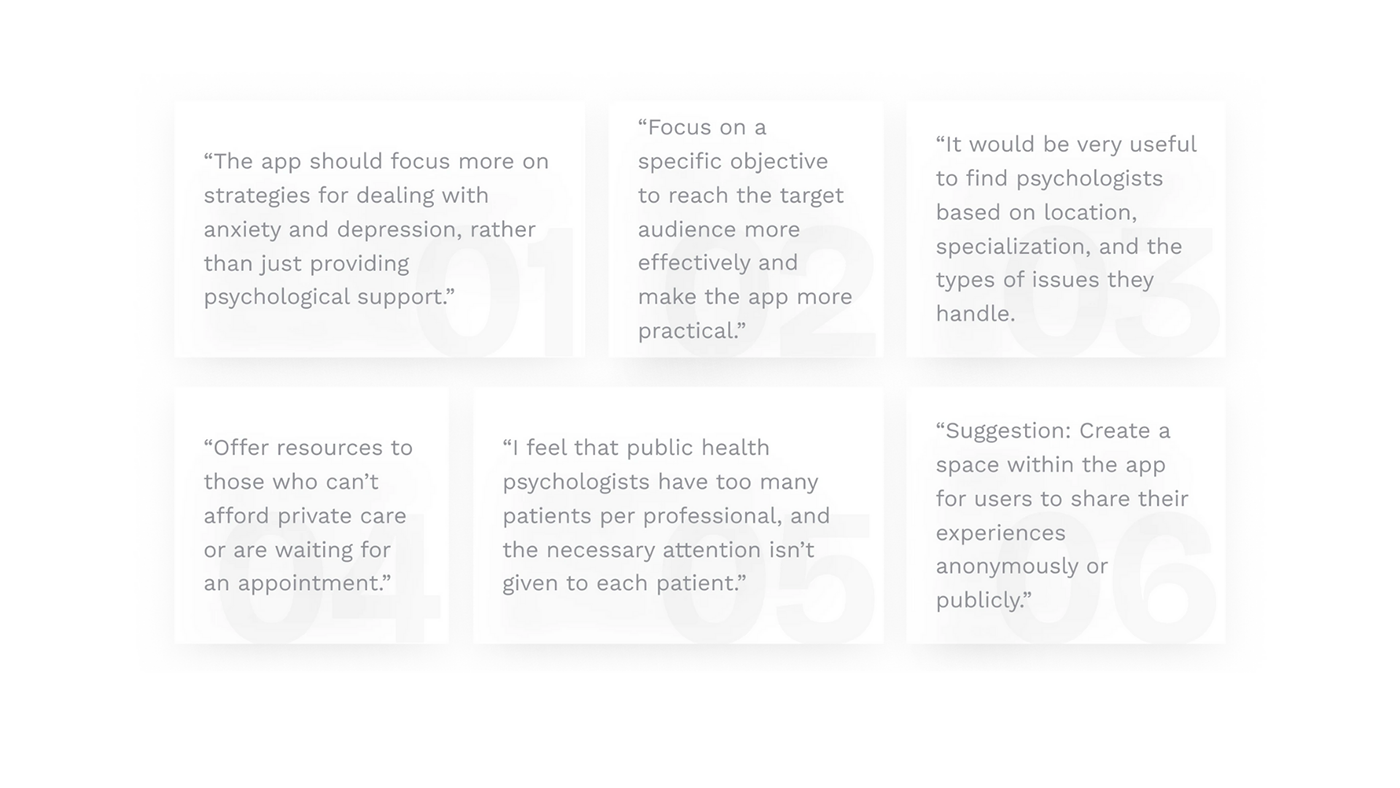
What students told us

Open-ended responses from the second survey highlighted practical expectations for a mental health literacy app.

Six user quotes from survey research

Two user archetypes

To better understand our users' goals, behaviors, and pain points, we created two personas representing key user segments. These personas were built from survey data and empathy interviews and were refined throughout the project to ensure the app addressed real user needs.

Why did you decide that you need personas?

Personas helped ensure our design choices were grounded in the diverse needs of our target users, from students to young professionals struggling with mental health access.

At which stages of the design process did you reflect back on the personas?

We referenced personas during:

  • Feature Ideation: To ensure features met user needs.
  • Customer Journey Mapping: To visualize how users would engage with the app.
  • Wireframing: To design intuitive, user-friendly interfaces.

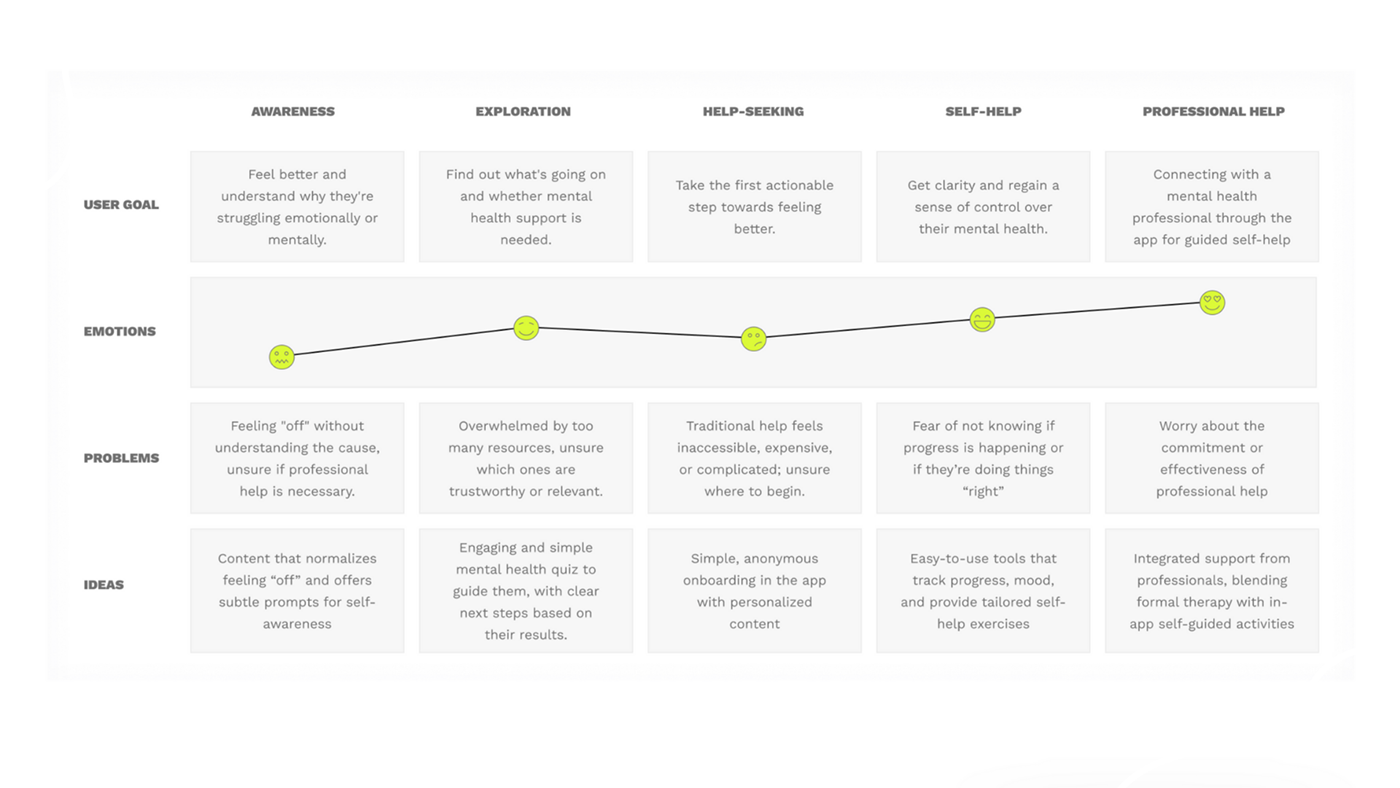
Mapping the path to support

We created a customer journey map to build a better understanding of how customers find and interact with the service and to discover opportunities for improvement. The map revealed many user problems and opportunities at the consideration and loyalty stages of the customer journey. Therefore, we paid special attention to these stages during the design process.

What did you want to find out with customer journey mapping?

We wanted to identify how university students experience mental health challenges and how the WHYSE App's features could address their needs. Specifically, we aimed to discover barriers to help-seeking and ways to make mental health support more engaging and accessible.

WhyseApp customer journey map

Low-fidelity UI in Canva

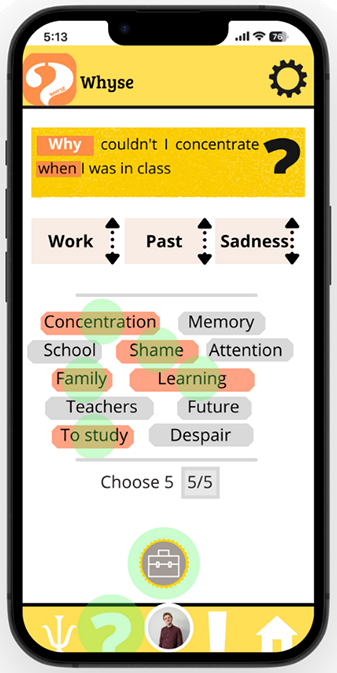
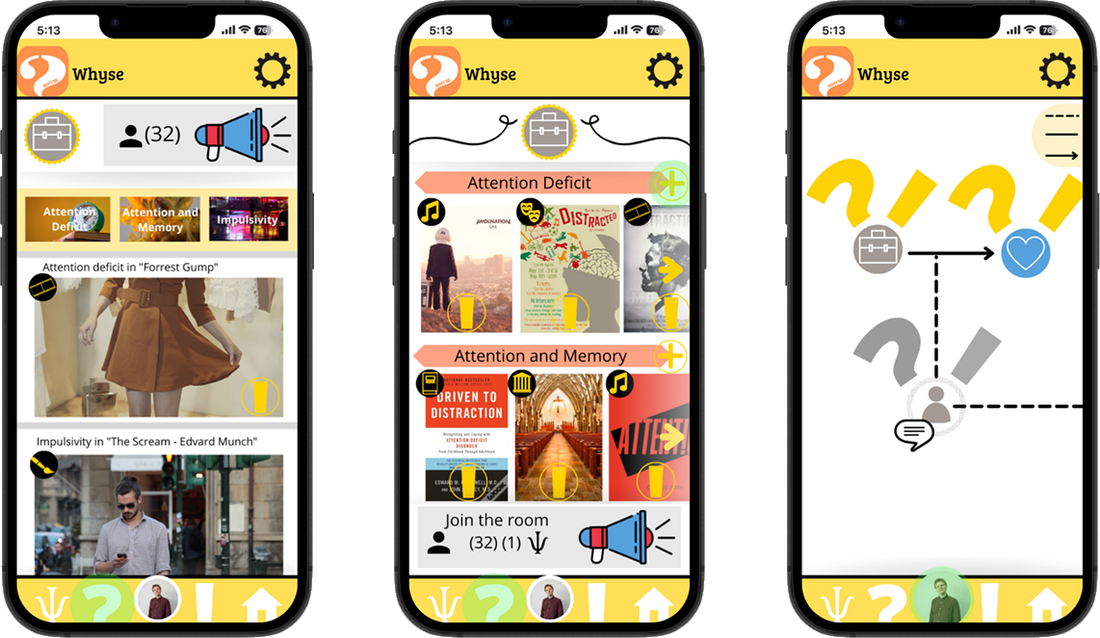
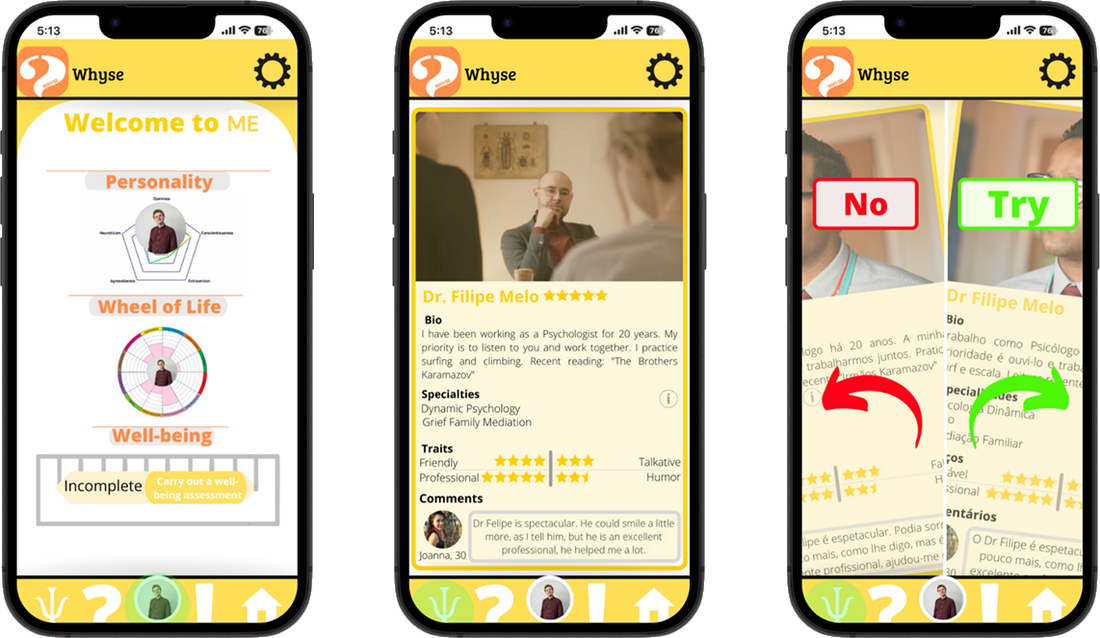
Using Canva, I translated my initial sketches into low-fidelity UI designs to visualize the app's core functionalities. These emphasized key features like the question generator, content tagging system, and professional support access. I focused on creating a user-friendly interface that would align with the app's goal of making mental health support more approachable and engaging.

I did not conduct usability tests at this stage but relied on continuous feedback loops with peers to refine the designs. This iterative process allowed me to adjust the app's navigation flow and improve the clarity of key elements, such as the question categorization and answer ranking systems.

In total, I made three iterations, refining them based on feedback and insights from the earlier personas and customer journey mapping. While I didn't transition to high-fidelity prototypes, these provided a solid foundation for the next steps in the design process, ensuring the app was both intuitive and aligned with user needs.
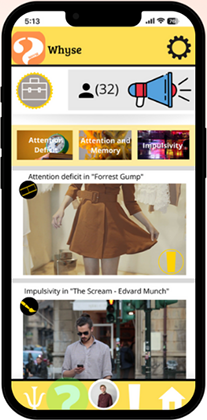
Low-fidelity wireframe: question generator screen
Three wireframe screens: feed, category view, and flow diagram Three wireframe screens: profile, psychologist detail, and matching flow

Learnings & next steps

This project deepened my understanding of user-centered design and the complexities of mental health support systems.

I learned the importance of personalization and anonymity in encouraging users to engage with mental health tools.

However, I identified gaps in applying behavioral science principles and the need for more structured methodologies to enhance user engagement.

To improve the Whyse App, I recognized the need to:

  1. Apply Behavioral Frameworks to systematically promote help-seeking behaviors.
  2. Broaden User Research with more diverse methods like focus groups and in-depth interviews.
  3. Conduct Usability Testing to identify friction points and optimize the user experience.
  4. Integrate with Institutions to embed the app into student wellness programs for broader impact.